
Posido Casino Login & Registration Guide
If you want to jump into Posido Casino but are unsure how registration, login, and verification actually work, this guide walks you through everything step by step. You’ll see how to pick your welcome bonus, create and verify your account, log in from any device, manage settings, and fix common login issues without stress.
Step-by-Step Registration at Posido
Let’s start with signing up to Posido Casino, because you can’t grab any bonus until your account is created. When you hit “Register” at Posido, you move through a short multi-step form that first shows your welcome bonuses, then asks for your email and password, and finally collects your personal details. The flow is split into small stages so you’re never staring at a wall of fields, and each step clearly shows what you need to fill in to continue.
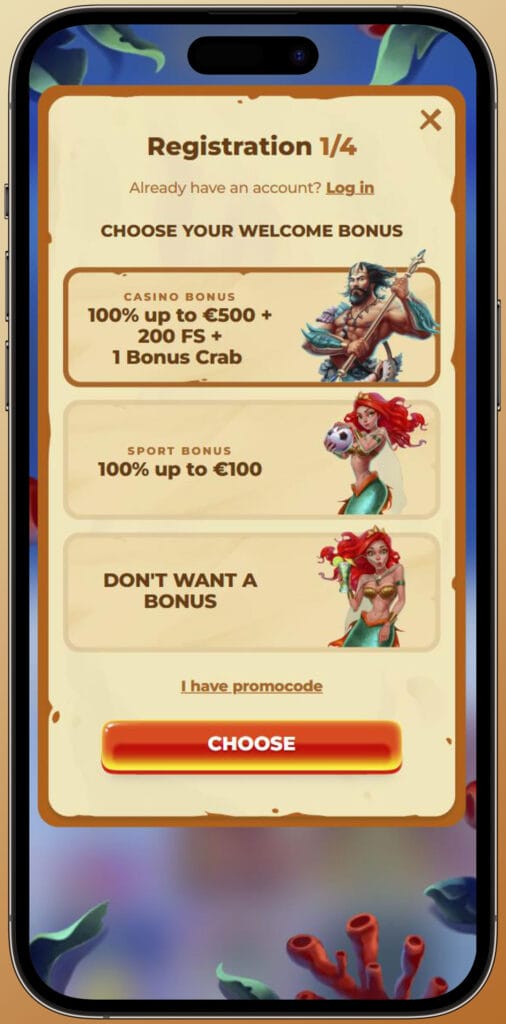
Choosing Your Welcome Bonus
On the first screen, you’ll see the “CHOOSE YOUR WELCOME BONUS” page with big tiles for the Casino Bonus and the Sports Bonus. The casino offer is 100% up to €500 plus 200 free spins and 1 Bonus Crab, while the sports offer is 100% up to €100 for your first sports deposit. If you’d rather play without any extra rules, you can select “DON’T WANT A BONUS”, and there’s also a field for entering a promo code if you have one before moving on.
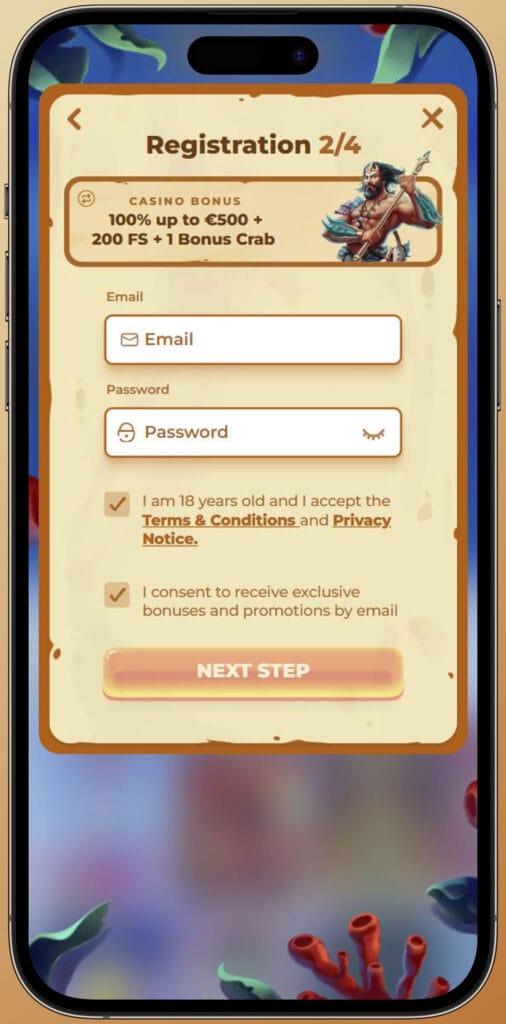
Filling in Personal Details
After you pick a bonus, the next step asks for your email and password, which will be your main login credentials at Posido Casino. On this screen, you must confirm that you’re at least 18 years old and accept the Terms & Conditions and Privacy Notice, because we can’t let you play for real money without that consent. Then you proceed to the personal data step, where you enter your name, last name, and date of birth so your account details can later be matched with your identity documents during KYC. If this information doesn’t match your documents, verification and withdrawals can be delayed, so it really pays to type everything exactly as it appears on your ID.
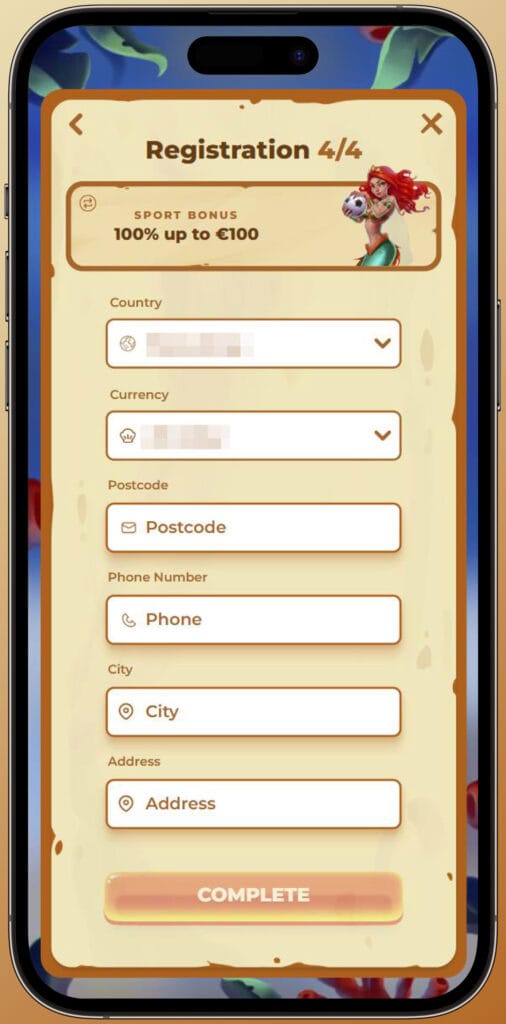
Account Activation and Email Verification
Once you complete all registration steps, our system sends a confirmation message to the email address you used on sign-up at Posido Casino. You’ll need to open that email and click the activation link, which finalises your account creation and proves you actually control that inbox. Until you verify your email, some features like deposits, bonuses, or withdrawals may stay limited or locked, so it’s smart to do this right away instead of postponing it. If you can’t find the email, check your spam and promotions folders first, and if it’s still missing, contact support so they can help you resend or troubleshoot it.
How to Log In to Your Account
Now, once your account is active, logging in becomes a quick daily routine. You’ll see the “Log in” button at the top of the Posido website, and clicking it opens a small form where you can either use your email and password or, in some cases, log in with PlayID. The important thing is to keep your credentials private and to log out after you finish playing, especially if you’re on a shared computer or device.
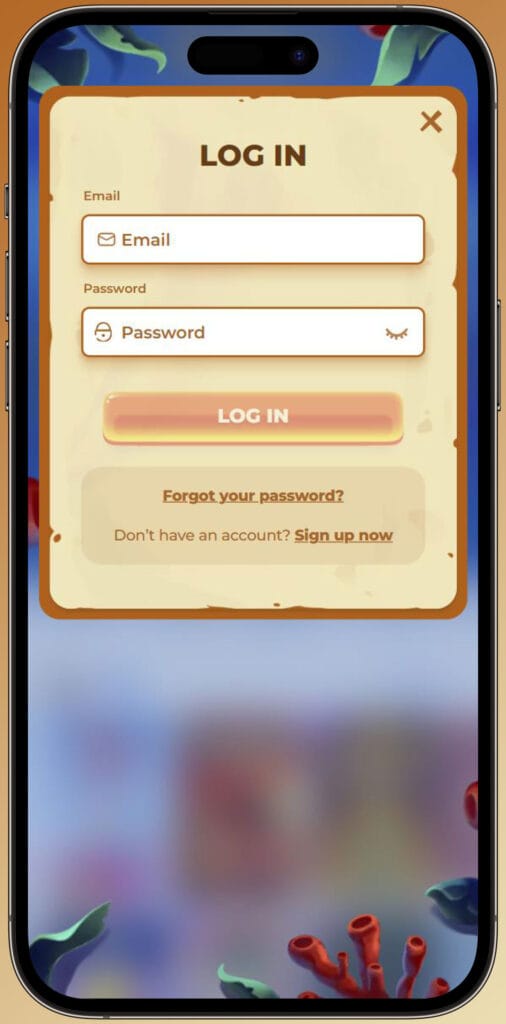
Standard Login
For standard login, you simply enter the email and password you set during registration in the fields on the login window. If both details are correct, you’ll be taken straight to your account dashboard, where you can make deposits, open casino or sports sections, and access your profile settings. If the system shows an error, it usually means something was mistyped, so double-check your email spelling, make sure Caps Lock isn’t on, and try again with the exact password you created. When you’re done playing for the session, hitting “Log out” from your profile helps keep your account safer against unauthorised access.
Log In with PlayID
On some registration steps, you’ll notice the “JOIN WITH PLAYID” option, and the same identity can later be used for logging in. PlayID works like a single sign-on solution that lets you connect with shared login details instead of managing separate email/password pairs for each site. If you choose to register through PlayID at Posido Casino, you can later pick “LOG IN WITH PLAYID” on the login screen and follow that path instead of entering your email and password manually. You still need to secure your PlayID itself with a strong password and, where available, extra security like two-factor authentication.
Logging In from Mobile Devices
Posido is fully optimised for mobile browsers, so there’s no need to download a separate app just to log in from your phone. You open the site on your iOS or Android device, tap the “Log in” button at the top, and use the same email/password or PlayID option you use on desktop. After logging in, the responsive layout lets you navigate easily between casino, live casino, sports, live betting, payments, and promotions, all adapted for smaller screens. Security features like encryption and login handling are the same across devices, so switching between desktop and mobile doesn’t compromise your safety.
Account Verification (KYC) Process
Here’s the thing: even if registration and login feel instant, full KYC verification is still required under the rules in Posido’s Terms & Conditions. The site explains that your identity, age, and sometimes source of funds must be checked to prevent fraud, money laundering, and underage gambling. You might be allowed to deposit and play at Posido Casino before verification in some cases, but at a certain point, you’ll receive a pop-up or email asking you to upload documents to your account. Completing this process early is a smart move because withdrawals and higher transaction limits depend on having a fully verified profile.
Required Documents for Identity Proof
For identity proof, we can request a valid document that clearly shows your full name, photo, date of birth, and expiry date. The FAQ mentions typical options like a passport, national identity card, or driving licence, as long as the entire document is visible, not expired, and not edited. In addition to ID, we may ask for proof of residence, such as a utility bill or bank statement issued within the last 3–6 months, which confirms the address you listed in your account. Sometimes proof of ownership of payment methods and short transaction histories (usually 1–3 months of card or e-wallet statements) are requested as well, especially when larger deposits or withdrawals are involved.
Verification Timeframes
Once you upload all the requested documents, their status in the Posido Casino verification section of your account typically changes to “Under review” automatically. The FAQ states that, in most cases, account verification is completed within about 24–48 hours after we receive everything, although more complex cases can take longer if extra checks are needed. Documents can be rejected for reasons like poor image quality, cropping, being expired, heavily edited or issued outside the acceptable timeframe, which is why clear and complete photos are essential. If anything gets declined, we’ll let you know what needs to be fixed or replaced, so you can upload better versions and avoid unnecessary delays.
Managing Your Account Settings
Once your Posido account is up and running, it’s worth getting familiar with the settings area. From your profile or wallet section, you can update some personal details, change your password, adjust communication preferences, and access responsible gaming tools. You can also see your balance, bonus status, and access transaction history, which helps you keep track of your deposits and withdrawals over time. Having all of this in one place makes it easier to stay in control of both your security and your spending.
Password Recovery and Security
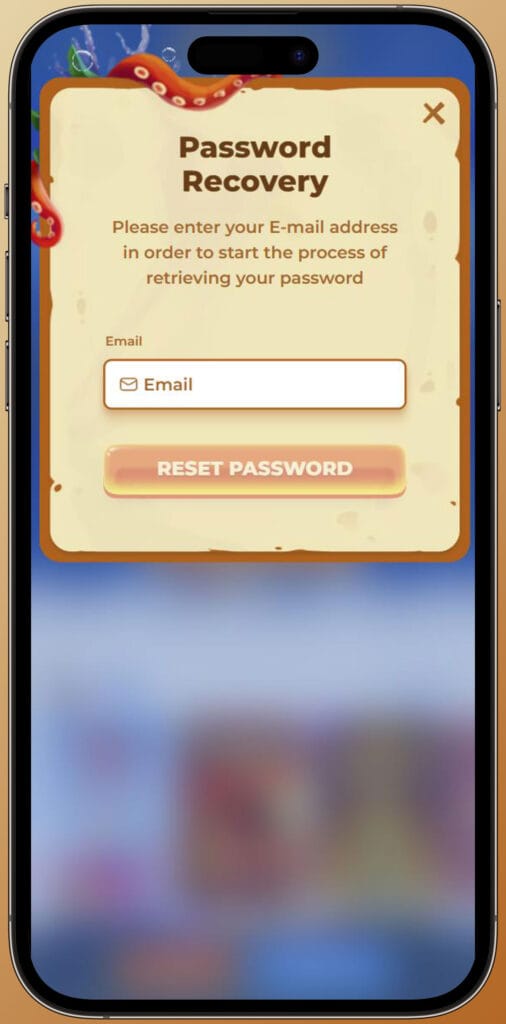
If you ever forget your password, you don’t need to create a new account; instead, you use the “Forgot password?” link on the login screen. After clicking it, you’ll be asked to enter the email associated with your Posido account, and we’ll send a password reset link to that address. Opening the link lets you set a new password by entering it twice, and once you save the changes, you can log in again using the updated details. For better security, choose a unique password with a mix of characters and avoid sharing it or saving it in browsers on shared devices, because protecting your credentials is ultimately in your hands.
Responsible Gaming Tools & Limits
Posido’s Responsible Gaming section explains that gambling should be treated as fun, not as a way to earn a living or chase losses. Inside your account and through the support team, you can request tools like deposit limits, loss limits, wagering caps, session reminders, temporary time-outs, or full self-exclusion, depending on your jurisdiction. These tools are designed to give you more control, so if you notice that you’re playing longer or spending more than planned, adjusting limits can help bring things back into balance. For more serious concerns, we also provide links and contacts for organisations such as GamCare, Gamblers Anonymous, and Gambling Therapy, which specialise in gambling-related support.
Viewing Transaction History
In the “My Wallet” or similar account section, you can access your transaction history, which lists past deposits, withdrawals, and sometimes bonus-related entries. This overview helps you see exactly how much you’ve moved in and out of Posido over a chosen period, making budgeting and responsible play much easier. It’s also useful when you’re preparing documents for Posido KYC, because your bank or e-wallet statements should line up with the transactions you see in your account. If you ever think a payment looks odd or is missing, this is the first place to check before contacting support with screenshots.
Common Login Issues & Solutions
Even with a simple login form, small issues can pop up from time to time. The FAQ suggests starting with basic checks like making sure your email is correct, verifying that Caps Lock is off and confirming that you’re typing the most recent password. If the site doesn’t load properly or games and forms won’t open, clearing your browser cache and cookies, disabling VPNs or ad blockers, and trying another browser (like Chrome, Firefox, Opera or Safari) are recommended steps. When the problem is more on the technical side, such as repeated loading failures, contacting support and sharing screenshots of the error helps the team guide you faster. If you suspect someone else has gained access to your account, you should immediately request a password reset and reach out to support so they can secure the profile and review activity.
Conclusion
Bottom line, getting set up at Posido is a straightforward process once you know the flow. You register in a few steps, choose your welcome bonus, verify your email, log in from any device, and complete KYC so withdrawals run smoothly. From there, managing your account, setting limits, and handling password or login issues all happen through clear tools and a support team that’s available via Live Chat and email.

FAQ
Yes, you can complete registration and log in directly from your mobile browser, using the same email and password or PlayID you’d use on a desktop, with full access to casino, live casino, and sports. The mobile site keeps the same encryption, payment methods, and bonuses, so you don’t lose features by playing on your phone instead of a computer. You just visit the Posido site, tap “Register” or “Log in” at the top, and follow the same steps as on desktop, with all pages optimised for touch screens.
Click “Forgot password?” on the login screen, enter the email linked to your account, then use the reset link we send you to set a new password and regain access. Make sure you check your spam or promotions folder if you don’t see the email within a few minutes, and always open the link from a secure device. When you create a new password, choose something unique that you don’t use on other sites, since reusing passwords can make it easier for attackers to compromise multiple accounts.
Documents are required for KYC verification to confirm your identity, age, address, and payment ownership, which helps prevent fraud and keeps your account and funds safer. Regulations require the casino to know who is playing, to block underage users, and to detect suspicious financial activity or misuse of payment methods. Verifying documents also protects you, because it makes it much harder for someone else to withdraw your winnings or change key details without proof that they’re the real account holder.
Once you upload clear, valid documents, verification is typically completed within about 24–48 hours, although more complex reviews can take longer if extra checks are needed. During this period, your documents show as “Under review” in the account, so you don’t need to contact support just to confirm they’ve been received. If files are blurry, expired, cropped, or don’t match your account data, they may be rejected, and you’ll be asked to upload better copies, which can extend the total timeframe.
Try refreshing the page, switching to another browser, clearing cache and cookies, and disabling VPNs or ad blockers; if the issue persists, contact support and include screenshots of the problem. The FAQ specifically suggests trying browsers like Chrome, Opera, Firefox, or Safari, as well as temporarily disabling antivirus or VPN software that may interfere with game loading. If none of that helps, reaching out via Live Chat or email with details about your device, browser, and any error messages lets the team troubleshoot faster and suggest targeted fixes.
Some basic details, like contact information, can only be updated by contacting Customer Support and explaining what needs to be changed and why. Sensitive data tied to verification, such as your name or date of birth, generally cannot be freely edited because it must match your submitted documents for security reasons. If you’ve genuinely made a mistake or legally changed something like your name, support may ask for additional proof before updating your profile to keep everything compliant and safe.
Yes, deposits and/or withdrawals may be blocked or limited until the verification process is fully completed on your Posido account. You might still be able to browse games, and sometimes even deposit, but cash-out options can remain restricted until all requested documents are approved. This setup ensures that funds are only paid out to fully verified players, which reduces the risk of fraud and keeps the platform in line with regulatory requirements.
If you don’t have a specific document or you’re having trouble uploading files, the FAQ advises contacting Customer Support and explaining what you’re missing and why. The team can review your situation and, in some cases, suggest acceptable alternatives or give you technical guidance on how to upload images correctly. Providing clear screenshots of any upload error messages also helps support identify whether the problem is file format, size, connection-related, or something else on the system side.